
POS Software Through the Business Day: From Opening Float to Closing Report
Most guides list features. This one follows a normal trading day, because that is where Business POS software proves its worth. From the first sale to the final cash count, here is what good POS software does at each stage, and what to look for when you compare options.
Before You Open: Setup and Preparation
Good days start with accurate data. POS software holds your product list, prices, tax rates and staff accounts, so the system is ready the moment the doors open.
Opening the Till
Staff log in with personal accounts, and the software records the starting cash float. This creates a clear baseline, so any difference at closing can be traced to a shift and a person.
Checking Stock Overnight
Many systems show low-stock warnings on the home screen. A quick glance tells you what to reorder before a bestseller runs out.
During Trading Hours: Speed and Accuracy
Ringing Up Sales
The cashier scans a barcode or taps an item, and the software finds the price, applies tax and handles any discount. Fast item lookup matters most when a queue forms, so test search speed during a demo.
Taking Payment
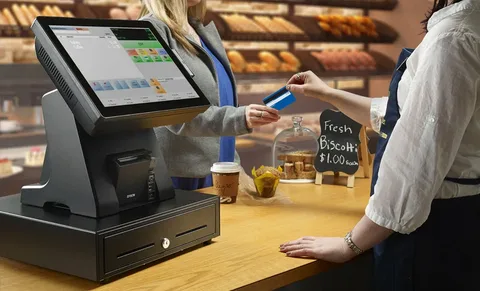
Customers pay by cash, card, contactless, mobile wallet or a mix. Strong POS software handles split payments, such as part cash and part card, without a workaround. Refunds and exchanges should take seconds and need a manager’s approval.
Handling Product Variations
Shops that sell sizes, colours or flavours need software that manages variants under a single product. Without it, your product list fills up with near-duplicates.
Serving Repeat Customers
Customer profiles store contact details and purchase history. Loyalty points or store credit give regulars a reason to return, and you can see who your best customers are.
Behind the Scenes: Inventory That Updates Itself
Each sale reduces the stock count immediately. When the count falls below your minimum level, the software flags it. Some systems create a draft purchase order from those alerts.
Look for these inventory basics:
- Barcode scanning and label printing
- Stock transfers between branches
- Supplier records and purchase history
- Stock counts and adjustments for damaged or missing items
Managing Staff Without Hovering
Role-based permissions mean a new employee can process sales but cannot change prices, delete transactions or issue large refunds. The activity log shows who did what and when. This protects the business and also protects honest staff from unfair blame.
Closing Time: Reports Without the Spreadsheet
End-of-Day Summary
The software totals sales by payment method, so you can compare expected cash against what is in the drawer. Differences show up straight away.
Reports Worth Reading
Focus on a few simple reports:
- Sales by hour, to plan staffing
- Sales by product and category, to guide ordering
- Sales by staff member, to spot training needs
- Profit margin by item, to find what actually earns money
Reports should export in one or two clicks, so your accountant gets the figures without retyping.
Cloud, Installed or Hybrid?
Cloud-based POS software keeps data online. You can check the day’s sales from home, add branches easily and receive updates automatically. It does depend on internet access, so ask about offline mode.
Installed software runs on your own computer and does not rely on a connection. You handle backups and updates yourself.
Hybrid systems trade locally and sync when the connection returns, which suits areas with unreliable internet.
POS software in Pakistan helps businesses manage sales, billing, inventory, payments, and daily operations from one centralized platform.
What Does POS Software Cost?
Pricing varies, so look at the full picture:
- Monthly subscription or one-time licence
- Hardware such as scanners, printers and card readers
- Card processing fees
- Setup, training and support charges
- Paid add-ons for features you assumed were included
Ask for a 12-month total based on your real sales volume.
How to Test Before You Commit
- Request a trial or live demo. Enter a handful of real products.
- Process test sales. Try a refund, a split payment and a discount.
- Run a closing report. See how clear and exportable it is.
- Contact support. Send a question and check how quickly someone answers.
- Check your exit options. Make sure you can export your own data.
Conclusion
POS software works quietly through every part of the day. It starts the shift with accurate data, speeds up each sale, tracks stock as it moves, controls staff access and turns the closing count into clear reports. When you compare options, judge them against this daily routine rather than a long feature list. Test with your own products, compare the total cost and choose the provider that supports you when it matters.
Streamline billing, sales tracking, inventory control, and everyday business tasks with an efficient POS solution.