Smart home technology has made it easier to control many household devices from a phone, voice assistant, or automated schedule. From lights and thermostats to televisions and entertainment systems, homeowners can create routines that make everyday technology more convenient.
This naturally raises an interesting question for IPTV users: Can you use IPTV with a smart plug or smart home automation setup?
In most cases, yes. A smart plug can control the electrical power supplied to compatible IPTV equipment, while smart home systems can sometimes control televisions and connected streaming devices through supported technologies. However, there are some important limitations to understand.
For people using IPTV India services, knowing how smart plugs, televisions, IPTV applications, and Indian IPTV Box devices interact can help create a convenient and reliable entertainment setup.
Table of Contents
- What Is a Smart Plug?
- Can You Use a Smart Plug With IPTV?
- How Does a Smart Plug Control an IPTV Setup?
- Can Smart Home Automation Control Your TV?
- Smart Plug vs. HDMI-CEC
- Using an Indian IPTV Box With a Smart Plug
- What Are the Benefits of Smart Home IPTV Automation?
- Potential Problems and Limitations
- Smart IPTV Automation Ideas
- Safety Tips for Using Smart Plugs
- Frequently Asked Questions
- Final Thoughts and CTA
1. What Is a Smart Plug?
A smart plug is an electrical device that connects between a wall outlet and another appliance. Depending on the model, it can allow you to control the connected device through a mobile application, voice assistant, schedule, or smart home automation platform.
Some smart plugs can also monitor energy consumption.
For example, a smart plug might allow you to create a schedule that switches a connected device on or off at specific times. Some models also support remote control through an internet-connected application.
This makes smart plugs useful for certain home entertainment devices.
However, a smart plug controls electrical power. It does not directly control the IPTV application, channel selection, account, or streaming service.
2. Can You Use a Smart Plug With IPTV?
Yes, but there is an important distinction.
You can use a smart plug to control the power supply of an IPTV-related device, such as:
- Television
- IPTV box
- Streaming device
- Router
- Other compatible entertainment equipment
However, turning the electrical power off is different from telling an IPTV application to stop playback.
For example, you could create a schedule that turns off the power to your television at night. When the smart plug switches off, the television loses power.
When power is restored, however, the television may not automatically return to exactly the same state. Some televisions remain in standby mode when their power is interrupted, while others may require the physical remote or a power button to turn them back on. TP-Link, for example, notes that many TVs enter standby rather than completely powering off, meaning a smart plug may require the TV to be manually powered on after power is restored.
Therefore, compatibility with your specific television is important.
3. How Does a Smart Plug Control an IPTV Setup?
Think of a smart plug as a power controller rather than an IPTV controller.
A basic setup could look like this:
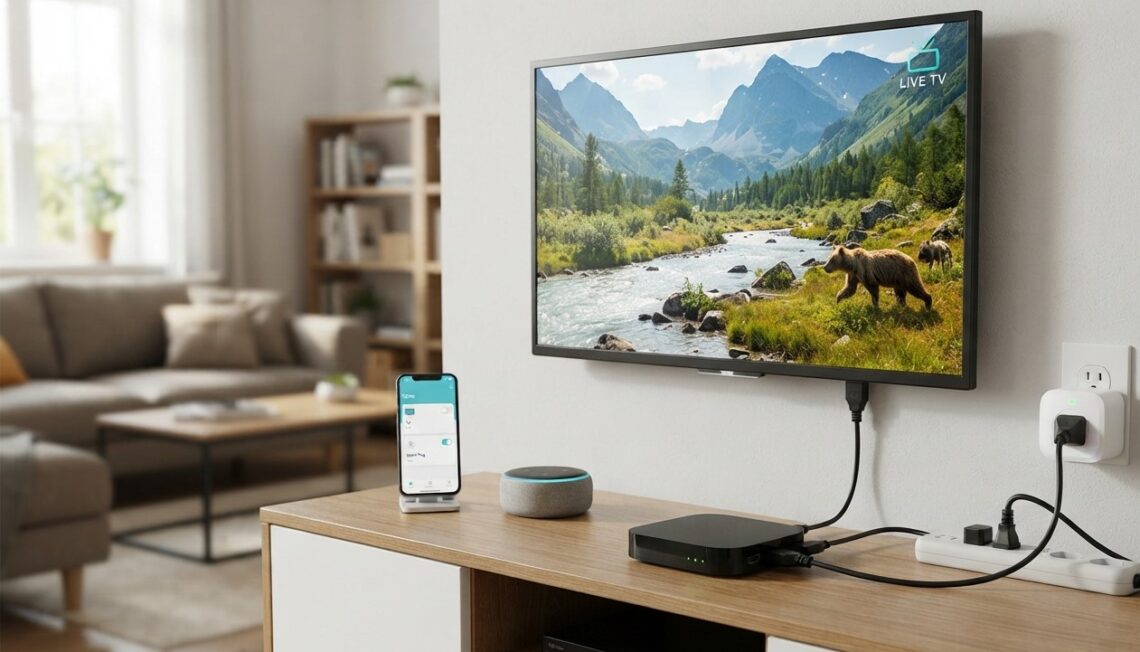
Wall outlet → Smart plug → Television/IPTV equipment
You can then use the smart plug’s application or connected smart-home platform to control whether electricity reaches the connected equipment.
For example:
- Your IPTV television is connected to a smart plug.
- You create a schedule in the smart plug application.
- The plug switches off at a selected time.
- The television loses power.
- The plug switches back on according to your schedule.
This can be convenient for managing equipment that you do not want running continuously.
However, you should not assume that every IPTV device will automatically restart after power is restored.
4. Can Smart Home Automation Control Your TV?
Sometimes, yes.
Smart TVs and streaming devices may support more sophisticated control than a simple smart plug.
One technology that can be particularly useful is HDMI-CEC. HDMI-CEC allows compatible HDMI devices to communicate and control certain functions of one another. Android’s TV documentation describes functions such as switching inputs and powering connected devices through HDMI-CEC.
Google also explains that compatible TVs and streaming devices can use HDMI-CEC for functions such as turning a TV on and switching to the appropriate HDMI input.
This means that, with compatible hardware, a smart home setup may be able to do more than simply cut electricity.
For example, a compatible automation might be able to:
- Turn on the television
- Switch to the appropriate HDMI input
- Control a connected streaming device
- Turn the television off
The exact capabilities depend on the television, streaming device, software, and smart-home platform.
5. Smart Plug vs. HDMI-CEC
Smart plugs and HDMI-CEC solve different problems.
| Feature | Smart Plug | HDMI-CEC |
|---|---|---|
| Controls electrical power | Yes | No, not directly |
| Can switch TV input | No | Yes, on compatible devices |
| Can control connected HDMI equipment | No | Yes, on compatible devices |
| Can schedule power | Often | Depends on ecosystem |
| Requires compatible HDMI devices | No | Yes |
| Can help automate TV use | Yes | Yes |
A smart plug is essentially a power-control solution, while HDMI-CEC is a device-control communication system.
For an advanced IPTV setup, you may even use both technologies where the hardware supports them.
6. Using an Indian IPTV Box With a Smart Plug
An Indian IPTV Box can potentially be connected to a smart plug just like other electronic equipment.
For example, you could connect the IPTV box to a smart plug and create a schedule for when the box receives power.
However, there are several things to consider.
Does the Box Automatically Restart?
Some devices automatically boot when power returns. Others remain in standby or require a button press.
Check your device’s settings or documentation before relying on automated power cycling.
What Happens to the IPTV App?
If the box loses power while an IPTV application is running, the application may close. After restarting, the device may return to the home screen rather than automatically reopening the IPTV application.
What About the Router?
If the IPTV box depends on Wi-Fi or another network connection, turning off the router with a smart plug will disconnect the IPTV box from the internet.
Therefore, you generally should not automate the router’s power schedule unless you specifically understand the consequences.
7. What Are the Benefits of Smart Home IPTV Automation?
Smart home automation can provide several conveniences for IPTV users.
Scheduled Shutdown
You can schedule entertainment equipment to switch off at a particular time.
For example, a household could configure the television or compatible equipment to stop receiving power after bedtime.
Remote Power Control
Some smart plugs allow remote control through an app when the required internet and smart-home connection are available.
This can be useful if you accidentally leave compatible equipment powered on.
Voice Control
Depending on the smart plug and smart-home ecosystem, voice assistants may allow you to control connected devices.
Some smart plugs support voice control through platforms such as Google Assistant or Alexa.
Energy Monitoring
Certain smart plugs can measure or report energy consumption. This can help you understand how much electricity your entertainment equipment uses.
Smart Home Routines
You may be able to combine your IPTV setup with other household routines.
For example:
“Movie time” routine
- Turn on compatible entertainment equipment
- Adjust compatible lighting
- Switch the television to the appropriate input
The exact functions depend on your smart-home ecosystem and device compatibility.
8. Potential Problems and Limitations
Smart home automation is convenient, but it is not completely universal.
The TV May Not Restart Automatically
As mentioned earlier, cutting and restoring power does not guarantee that every TV will automatically turn back on.
IPTV Box May Need Manual Startup
Some boxes may remain in standby after power is restored.
Internet Dependency
Wi-Fi smart plugs generally require network connectivity for app-based control. If your home network is offline, remote control may not work.
Device Compatibility
Smart-home platforms do not support every television, IPTV box, or streaming device equally.
Sudden Power Loss
A smart plug effectively cuts power to the connected equipment. Repeatedly cutting power without allowing devices to shut down properly may not be ideal for every device.
For equipment that provides a normal shutdown option, use it when practical rather than repeatedly relying on abrupt power cuts.
9. Smart IPTV Automation Ideas
Here are some simple ideas for integrating IPTV into a smart home.
Nighttime Shutdown
Schedule compatible entertainment equipment to turn off at night.
Morning Routine
If your television and smart-home system support the required features, you could create a morning entertainment routine.
Movie Mode
Use compatible smart lighting and television controls to create a dedicated movie-watching environment.
Away Mode
Turn off selected entertainment devices when nobody is home.
Energy Monitoring
Use a smart plug with energy monitoring to track the electricity consumption of compatible entertainment equipment.
Voice Control
If your smart plug, television, and smart-home assistant are compatible, voice commands can make basic device control more convenient.
10. Safety Tips for Using Smart Plugs
Before connecting an IPTV setup to a smart plug, check the plug’s electrical ratings.
The total load connected to a smart plug should remain within its rated limits. TP-Link’s current guidance, for example, warns against using a smart plug with a power strip or extension cord in certain configurations because of potential overload risks.
A few practical precautions include:
- Check the smart plug’s rated load.
- Follow the manufacturer’s instructions.
- Avoid overloading the plug.
- Keep electrical equipment away from moisture.
- Use certified equipment from reputable manufacturers.
- Do not repeatedly power-cycle devices unnecessarily.
- Check whether your TV or IPTV box supports automatic startup.
- Keep firmware and smart-home applications updated.
If you are unsure whether a particular device is suitable for a smart plug, consult its manufacturer documentation or a qualified electrician.
11. Frequently Asked Questions
Can I connect my IPTV box to a smart plug?
Yes, provided the smart plug is appropriately rated for the device. However, check whether your IPTV box automatically starts after power is restored.
Can a smart plug turn my IPTV on and off?
A smart plug can control the electrical power supplied to the equipment. It does not necessarily control the IPTV application itself.
Can I use Alexa or Google Assistant with IPTV?
Potentially. Compatible smart plugs, TVs, and streaming devices can work with supported voice assistants. The available commands depend on the devices and smart-home platform.
Will a smart plug improve IPTV streaming quality?
No. A smart plug controls power and automation. IPTV quality primarily depends on your internet connection, device, application, and service.
Can I schedule my IPTV box to turn off at night?
You may be able to schedule the smart plug supplying power to the box. Whether the box behaves correctly when power returns depends on its design and settings.
Should I connect my IPTV router to a smart plug?
You can, but be careful with automated schedules. Turning the router off will interrupt the internet connection for IPTV and potentially other household devices.
Can an Indian IPTV Box work with smart home automation?
It can participate in a smart-home setup if the box, television, or connected equipment supports the necessary control methods. A smart plug can provide basic power control, while technologies such as HDMI-CEC can provide more advanced device communication on compatible equipment.
Does HDMI-CEC work with every TV?
No. HDMI-CEC support and available functions vary between manufacturers and devices. Android’s documentation specifically notes that implementations can differ, so two devices claiming CEC support are not necessarily guaranteed to offer identical compatibility.
12. Final Thoughts
You can use IPTV with a smart plug or smart home automation setup, but it is important to understand what each technology actually controls.
A smart plug primarily controls electricity, while smart-home integrations and technologies such as HDMI-CEC can provide more direct control over compatible televisions and streaming devices.
For IPTV India users, a smart plug can be a convenient way to manage compatible entertainment equipment, create schedules, or monitor energy consumption. An Indian IPTV Box can also be incorporated into a smart home, provided its power and startup behavior are compatible with the automation you want to create.
The best setup depends on your specific TV, IPTV box, router, smart plug, and smart-home platform. Before creating automated power schedules, check how your devices behave when power is removed and restored.
CTA
Want to make your IPTV setup more convenient? Explore compatible smart-home devices, check your TV and Indian IPTV Box specifications, and create automation routines that fit your household. With the right combination of compatible equipment and a reliable IPTV service, your entertainment system can become a seamless part of your smart home.