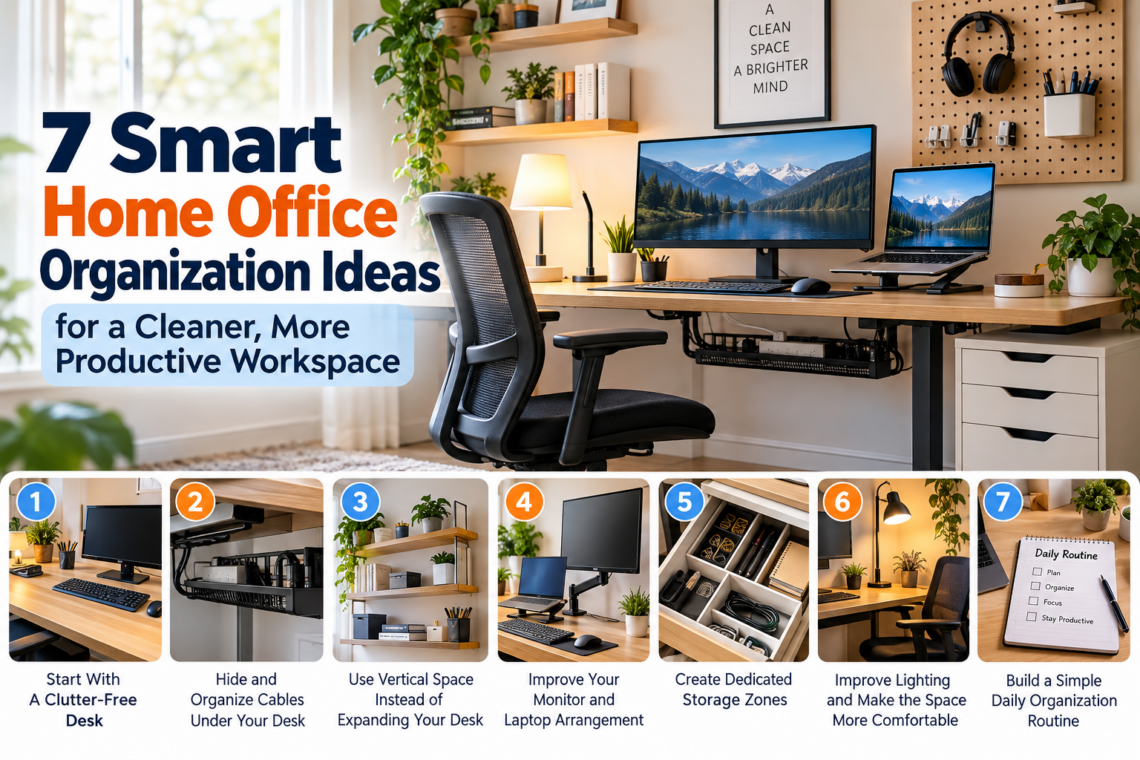
A well-organized home office can make a noticeable difference in how comfortably and efficiently you work. Whether you work remotely, run a small business, study online, or simply need a dedicated space for everyday tasks, your workspace should support concentration without feeling crowded or overwhelming.
Unfortunately, home offices often become cluttered with charging cables, paperwork, accessories, and equipment that gradually take over valuable desk space.
The good news is that creating a cleaner and more productive workspace does not necessarily require expensive furniture or a complete room renovation. A few thoughtful changes can improve storage, reduce visual distractions, and make your home office more enjoyable to use.
Here are seven practical home office organization ideas that combine functionality, comfort, and smart use of space.
1. Start With a Clutter-Free Desk
Your desk is the center of your home office, so keeping it organized should be your first priority.
A crowded desk can make everyday tasks more frustrating. Searching for documents, moving unnecessary accessories, and working around unused equipment can interrupt your workflow.
Begin by removing everything from the desk and sorting items into three categories: frequently used essentials, occasionally used supplies, and unnecessary clutter.
Return only the essentials to your main working area.
Consider keeping your laptop or monitor, keyboard, mouse, notebook, and one small organizer within easy reach. Store everything else in drawers, shelves, or labeled containers.
A simple desk organizer can hold pens, sticky notes, and small office supplies without occupying much space.
Practical tip: Spend five minutes clearing your desk at the end of each workday. This small habit helps prevent clutter from building up again.
2. Hide and Organize Cables Under Your Desk
Loose charging cables, power cords, and extension leads are among the most common sources of home-office clutter.
Besides making a workspace look untidy, tangled cables can complicate cleaning and make it difficult to identify the correct connection when equipment needs to be moved.
One effective solution is to install a cable management tray beneath your desk.
These trays provide a designated location for power strips and excess cable lengths, helping keep the floor and desktop clear.
For a more detailed explanation of different tray designs and installation options, this guide to choosing an under desk cable management tray offers practical considerations for organizing workspace cables.
You can also use reusable cable ties, adhesive clips, and cable sleeves to group cords and route them neatly along desk legs.
When arranging cables, avoid tightly bending cords or overloading power strips. Keep ventilation openings clear and follow the electrical equipment manufacturer’s safety instructions.
Practical tip: Label cables near their plugs so you can identify your monitor, laptop charger, printer, and other devices without tracing each cord.
3. Use Vertical Space Instead of Expanding Your Desk
A small home office does not always have enough room for additional cabinets or wide storage furniture.
Instead of using more floor space, look upward.
Wall-mounted shelves, pegboards, and vertical organizers can provide useful storage without making the room feel crowded.
Floating shelves are particularly helpful for storing books, decorative items, and office supplies that do not need to remain on the desk.
A pegboard can hold headphones, stationery containers, small tools, and lightweight accessories.
If your desk is positioned against a wall, consider adding a narrow shelf above it for frequently used reference materials.
However, avoid placing heavy objects above your workstation unless the shelving is securely installed and rated for the intended weight.
Practical tip: Keep frequently used items at a comfortable height and store occasional-use supplies on higher shelves.
4. Improve Your Monitor and Laptop Arrangement
A poorly arranged computer setup can make even a spacious desk feel cramped.
If you use a laptop alongside an external monitor, consider arranging both screens so that they fit your workflow without requiring constant twisting or reaching.
A monitor arm can free up desk space by replacing a bulky monitor base. It can also make it easier to adjust screen height and position.
For laptop users, a suitable stand can raise the display while leaving room for accessories underneath.
When using a raised laptop as a primary workstation, an external keyboard and mouse may help maintain a more comfortable posture.
Your monitor should generally be positioned at a comfortable viewing distance, with the screen height adjusted to reduce unnecessary neck strain.
The ideal arrangement depends on your chair, desk height, screen size, and individual comfort.
Practical tip: Position the screen you use most often directly in front of you and keep commonly used accessories within easy reach.
5. Create Dedicated Storage Zones
A home office becomes easier to manage when every category of item has a designated place.
Instead of mixing documents, charging accessories, stationery, and personal belongings in one drawer, create separate storage zones.
For example, use one drawer for office supplies, another for electronic accessories, and a small file organizer for important paperwork.
Labeled boxes can help you identify items quickly without opening every container.
If you regularly work with printed documents, separate them into categories such as incoming, action required, and completed.
This simple system makes paperwork easier to manage and reduces the likelihood of important documents getting buried under unrelated items.
Digital organization matters too. Create clear folders for work files, remove unnecessary downloads, and back up important documents using a reliable storage method.
Practical tip: Keep a small tray for items that need attention during the day, then empty it before finishing work.
6. Improve Lighting and Make the Space More Comfortable
Organization is not only about storage. The overall environment also affects how pleasant and practical a workspace feels.
Poor lighting can make reading and computer work uncomfortable, while excessive glare can interfere with screen visibility.
Whenever possible, position your desk to benefit from natural daylight without placing the screen directly in front of a bright window.
A desk lamp with adjustable brightness can provide focused lighting for reading, writing, and other detailed tasks.
Choose lighting that suits your activities and avoids harsh reflections on your monitor.
Comfortable seating is equally important.
Select a chair that supports your posture and allows your feet to rest comfortably on the floor or a suitable footrest.
If you spend long hours at your desk, remember to change positions and take regular movement breaks.
Small decorative elements, such as a plant or framed artwork, can make the workspace feel inviting without creating unnecessary clutter.
Practical tip: Use one primary desk lamp and keep decorative accessories minimal so the working surface remains functional.
7. Build a Simple Daily Organization Routine
Even the best home-office storage system will eventually become ineffective without consistent habits.
Fortunately, maintaining an organized workspace does not require a complicated cleaning schedule.
A short daily routine can keep clutter under control.
At the beginning of the workday, check that your essential equipment is ready, remove unnecessary items, and identify the tasks you need to complete.
During the day, return supplies to their designated locations after using them.
Before leaving your desk, organize loose papers, put away accessories, and clear any temporary clutter.
A weekly review can help you identify supplies that need replacing, cables that require attention, and documents that can be archived.
Practical tip: Set aside ten minutes every Friday to review your workspace and prepare it for the following week.
Home Office Organization Ideas for Small Spaces
Not everyone has a separate room for a home office.
If your workstation is located in a bedroom, living room, or shared space, organization becomes even more important.
Choose furniture that serves more than one purpose.
A compact desk with built-in drawers can reduce the need for additional storage units. A folding desk may be useful when floor space is limited.
Wall-mounted organizers, stackable containers, and slim rolling carts can also help keep supplies accessible without occupying large areas.
If you share your workspace with family members, consider using labeled storage boxes so personal and work-related items remain separate.
The goal is to create a practical working area that can be maintained easily, regardless of room size.
Common Home Office Organization Mistakes to Avoid
While improving your workspace, avoid changes that create new problems.
Buying too many organizers: Storage accessories are only useful when they solve an actual problem. Purchasing several containers without first reducing clutter may simply create more items to manage.
Ignoring cable safety: Hiding cables should never compromise electrical safety, airflow, or access to power connections.
Overcrowding shelves: Decorative storage can look attractive, but overloaded shelves may become difficult to use and potentially unsafe.
Keeping everything within reach: Not every office item needs to stay on your desk. Store less frequently used supplies elsewhere.
Choosing appearance over comfort: A visually attractive setup is less useful if your chair, monitor, or keyboard position makes everyday work uncomfortable.
The most effective organization system balances appearance, accessibility, and long-term usability.
Frequently Asked Questions
How can I organize my home office on a small budget?
Start by removing unnecessary items and reusing storage containers you already own. Affordable cable ties, drawer dividers, wall hooks, and simple desk organizers can improve your workspace without major expenses.
What is the best way to hide computer cables?
Under-desk cable trays, reusable cable ties, and cable clips can help organize cords. Choose solutions that keep connections accessible and do not create electrical or ventilation hazards.
How do I make a small home office look bigger?
Use vertical storage, minimize desktop clutter, choose appropriately sized furniture, and maintain consistent lighting. Keeping floor space clear can also make a small room feel more open.
How often should I clean and organize my home office?
A five-minute daily reset and a more thorough weekly review work well for many people. Adjust the routine according to how frequently you use your workspace.
Do I need expensive furniture for a productive home office?
No. A functional desk, comfortable chair, suitable lighting, and an organized equipment layout are more important than expensive decorative furniture.
Final Thoughts
Creating a cleaner and more productive home office is about making practical improvements that support your daily activities.
From organizing cables and maximizing vertical storage to improving monitor placement and developing simple maintenance habits, small changes can make a meaningful difference.
The best workspace is not necessarily the largest or most expensive. It is one where essential items are easy to find, equipment is comfortably arranged, and unnecessary distractions are minimized.
Start with one area of your home office, make a few manageable improvements, and gradually build an organization system that works for your space and routine.