
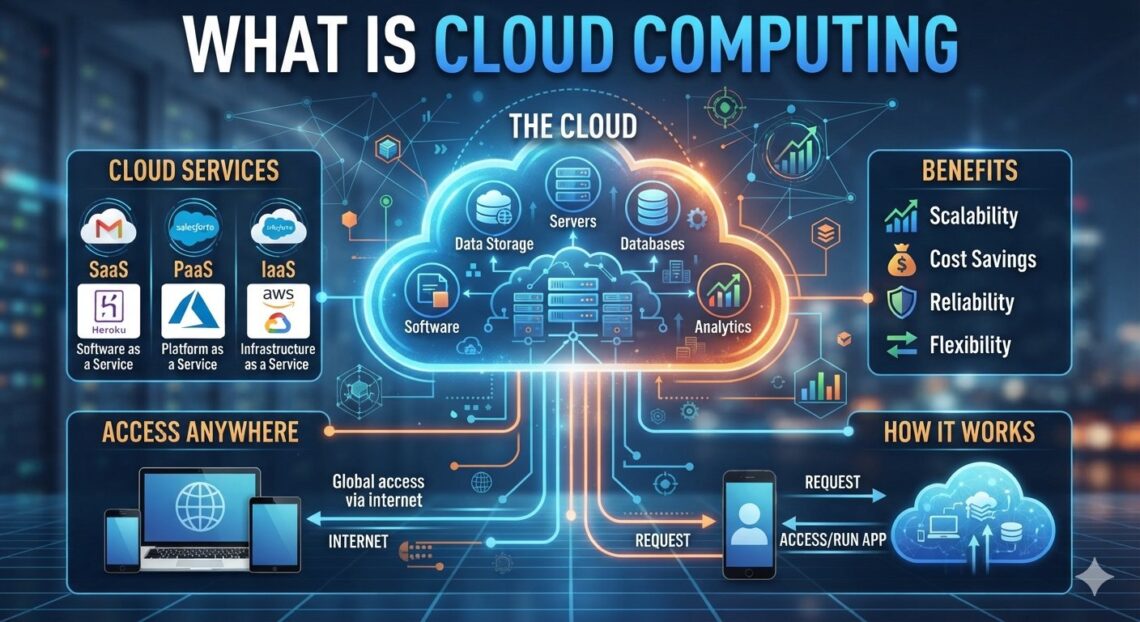
Cloud computing is the delivery of computing services (storage, servers, databases, software, and networking) over the internet, usually on a pay-as-you-go basis. Instead of buying and maintaining your own hardware, you rent what you need from a provider and access it from anywhere with a connection.
What Is Cloud Computing, in Plain English?
What is Cloud Computing? Think about electricity. You don’t run a generator in your backyard. You plug in, use what you need, and pay for what you used. Cloud computing works the same way for technology.
When you save a photo to online storage, stream a film, or edit a shared document with a colleague, you’re using the cloud. The files and programs live on powerful computers in remote data centers owned by a provider, and you reach them through the internet.
The US National Institute of Standards and Technology (NIST) defines cloud computing as a model for enabling on-demand network access to a shared pool of configurable computing resources that can be provisioned quickly with minimal management effort. In everyday terms: shared, rentable, scalable computing.
Why Do People Search for “Cloud Computing”? (Search Intent)
Most beginners want one of three things:
- A clear definition without jargon
- An understanding of how it affects daily life or work
- A sense of whether it’s safe, affordable, and worth learning
This guide covers all three.
How Does Cloud Computing Work?
Providers operate large data centers filled with servers. Software called virtualization divides those physical machines into many smaller virtual ones, so thousands of customers can share the same hardware securely.
Here’s the basic flow:
- You request a resource, such as storage space or a virtual server, through a website or app.
- The provider allocates it from its shared pool, usually within minutes.
- You use it over the internet, from any device.
- You pay for usage, often by the hour, gigabyte, or subscription tier.
- You scale up or down whenever your needs change.
The Main Characteristics of the Cloud
NIST lists five essential characteristics. Here they are in plain language:
| Characteristic | What it means for you |
|---|---|
| On-demand self-service | You set up resources yourself, without calling anyone |
| Broad network access | You can use it from a laptop, phone, or tablet |
| Resource pooling | Many users share the same infrastructure |
| Rapid elasticity | You can expand or shrink capacity quickly |
| Measured service | You’re billed for what you actually use |
The Three Main Types of Cloud Services
Cloud services are usually grouped into three models. A good way to remember them is by how much you manage yourself.
Infrastructure as a Service (IaaS)
You rent the raw building blocks: virtual servers, storage, and networks. You manage the operating system and applications. This suits IT teams that want maximum control.
Example: A startup rents virtual servers to host its web application.
Platform as a Service (PaaS)
The provider manages the infrastructure and operating system. You focus on building and running your application.
Example: A developer deploys code to a platform without configuring a server.
Software as a Service (SaaS)
You use a finished application through a browser or app. The provider handles everything behind the scenes.
Example: Web-based email, online word processors, and video conferencing tools.
The Four Cloud Deployment Models
| Model | Who uses it | Best for |
|---|---|---|
| Public cloud | Shared by many customers, run by a third party | Most individuals and small businesses |
| Private cloud | Dedicated to one organization | Organizations with strict control or compliance needs |
| Hybrid cloud | A mix of public and private | Businesses balancing flexibility and control |
| Multi-cloud | Services from more than one provider | Avoiding dependence on a single vendor |
Real-Life Examples You Already Use
You probably use cloud computing every day without noticing:
- Photo and file backup that syncs across your phone and laptop
- Streaming services that deliver video from remote servers
- Online banking and shopping, which depend on cloud infrastructure for reliability
- Collaborative documents that several people edit at once
- Online learning platforms, including trusted medical writing courses online and other professional training, which rely on cloud hosting to deliver video lessons, quizzes, and learner data to students worldwide
Benefits of Cloud Computing
- Lower upfront cost. You avoid buying expensive hardware and pay as you go instead.
- Flexibility. Capacity can grow or shrink with demand.
- Accessibility. Work from anywhere with an internet connection.
- Easier backup and recovery. Data can be replicated across locations.
- Faster setup. Resources that once took weeks to arrange can be ready in minutes.
- Automatic updates. The provider handles much of the maintenance.
Risks and Limitations to Know About
Cloud computing isn’t perfect, and an honest guide should say so.
- Internet dependence. No connection means no access to cloud-only tools.
- Ongoing costs. Pay-as-you-go can become expensive if usage isn’t monitored.
- Security responsibility. Providers secure the infrastructure, but you’re still responsible for strong passwords, correct settings, and access control. This is often called the shared responsibility model.
- Vendor lock-in. Moving between providers can be difficult once you’re deeply invested in one.
- Compliance. Regulated industries must check where and how data is stored.
Cloud Computing vs. Traditional On-Premises IT
| Factor | Cloud | On-premises |
|---|---|---|
| Upfront cost | Low | High |
| Scalability | Fast and flexible | Slow, hardware-limited |
| Maintenance | Mostly handled by provider | Handled by your team |
| Control | Shared with provider | Full |
| Access | Anywhere with internet | Often limited to the office network |
How to Get Started with Cloud Computing
- Start with SaaS. Use cloud storage or an online office suite to get comfortable.
- Learn the vocabulary. Understand IaaS, PaaS, SaaS, and the deployment models above.
- Try a free tier. Major providers offer free or low-cost entry levels so you can experiment. Check each provider’s current terms.
- Practice security basics. Use strong, unique passwords and turn on multi-factor authentication.
- Build skills gradually. Consider beginner certifications or structured online courses if you want a career in the field.
Frequently Asked Questions
1. What is cloud computing in simple words?
It means using computing services, such as storage, software, and servers, over the internet instead of owning and maintaining the equipment yourself.
2. Is the cloud just someone else’s computer?
Largely, yes. Your data sits on a provider’s servers. But those servers are professionally managed, shared securely, and scalable, which makes it more than simple remote storage.
3. What are the three types of cloud computing?
IaaS (infrastructure), PaaS (platform), and SaaS (software). They differ in how much you manage versus how much the provider manages.
4. Is cloud computing safe?
It can be very secure when configured properly. Security is shared: the provider protects the infrastructure, and you protect your accounts, settings, and data access.
5. Do I need technical skills to use the cloud?
No. Everyday SaaS tools need none. Building or managing cloud infrastructure does require training.
6. What is the difference between cloud storage and cloud computing?
Cloud storage is one service within cloud computing. Cloud computing also covers processing power, databases, networking, analytics, and software.
7. Is cloud computing expensive?
It depends on usage. It often reduces upfront costs, but unmonitored usage can raise monthly bills, so tracking spending matters.
8. What are examples of cloud computing?
Online file backup, streaming platforms, web-based email, video conferencing, and online learning portals.
9. What is the difference between public and private cloud?
A public cloud is shared among many customers and run by a provider. A private cloud is dedicated to a single organization.
10. Can online courses and professional training be delivered through the cloud?
Yes. Many e-learning platforms use cloud infrastructure to host lessons, handle logins, and serve students in different countries. This applies to fields such as medical writing, data, and design.
Conclusion
Cloud computing is the on-demand delivery of computing services over the internet. It’s flexible, scalable, and often cost-effective, though it comes with responsibilities around security, cost control, and vendor choice. You already use it daily, so the best next step is to understand it better. Start with simple SaaS tools, learn the core terms, and build from there.